







learning steno: part 0
learning steno
I have been exploring the deepest ends of typing, ergonomics, and stenography recently. I thought about building a georgi keyboard but lack of scad files, time, and my busy school schedule made that idea a mote point. I decided to pickup an off the shelf steno machine, the uni v4, since it was cost and time efficient.
Now the biggest challenge is learning the layout of the uni and putting in the practice hours to reap the life long rewards of typing close to the speed of my thoughts. To use the uni you have to install plover, an open source stenotype engine that translates mechanical keyboards presses to words with little to no latency. The instructions and documentation provided for the uni is great.
I find it very easy to learn new skills by creating a productive environment that facilitates the learning of this new skill. Linux makes it very easy to customize your desktop environment to ease the learning process.
I simply wanted to have a floating image of the uni steno layout floating on my window while i practice, something like this: 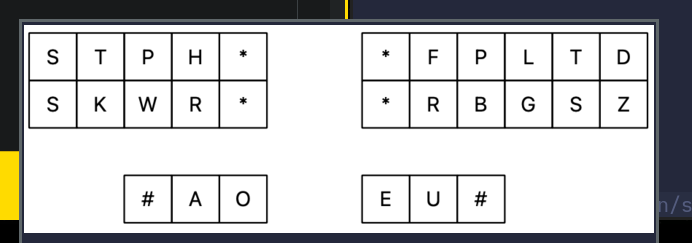
This is great since I do not have to look down at the board when chording on the uni.
These are the following pieces of software and hacks I used to make this happen:
- i3wm, a tiling window manager
- kitty, a graphical terminal
- nixos, a text based linux distro
- miscellaneous linux tools
- community forum answers: https://unix.stackexchange.com/a/474300
i3 handles the keybinding to execute the process and floats the window. Kitty creates a bash process that forks another kitty process running a kitty icat kitten to display the image in the terminal.
The following was added to my i3.nix to enable i3 to bind the floatimage script to Alt+Shift+M,
"${mod}+Shift+m" = "exec kitty --title floatimage_window ${local_bin}/floatimage";
The following snippet was also added to my i3.nix configuration file to float the window created,
for_window [ title="floatimage_window" ] floating enable resize set 640 260
title_align center
I then created the script:
#!/bin/sh

# TODO make image dmenu selectable
imageFilename="$HOME/Dropbox/learn/stenography/uni-layout.png"

if [ ! -f $noteFilename ]; then
  echo "File $imageFilename is not there, aborting."
  exit
fi

kitty +kitten icat $imageFilename &
# sxiv $imageFilename &
pid="$!"

# Wait for the window to open and grab its window ID
winid=''
while : ; do
    winid="`wmctrl -lp | awk -vpid=$pid '$3==pid {print $1; exit}'`"
    [[ -z "${winid}" ]] || break
done

# Focus the window we found
wmctrl -ia "${winid}"

# Make it float
i3-msg floating enable > /dev/null;

# Move it to the center for good measure
i3-msg move position center > /dev/null;

# Wait for the application to quit
wait "${pid}";
I chmoded the script and put it in my PATH so that my shell could find it.
nota bene
The script has drifted since I wrote this. kitty’s icat kitten gave way to
ghostty driving chafa, which draws the image as
terminal graphics and holds the window open until a keypress, and the layout
image itself moved from Dropbox to iCloud. It also sets its own window title
now, so the i3 binding no longer has to. The guard above was quietly broken
too: it tested $noteFilename, which is never set anywhere, and an unset
unquoted variable collapses it to [ ! -f ] - always false, so it never fired
and the script carried on with a missing image. It checks $imageFilename
now. The version I run today:
#!/bin/sh

# TODO make image dmenu selectable
imageFilename="$HOME/iCloud/learn/stenography/uni-layout.png"

if [ ! -f "$imageFilename" ]; then
  echo "File $imageFilename is not there, aborting."
  exit
fi

ghostty --title=floatimage_window -e sh -c "chafa \"$imageFilename\"; read -rsp 'Press any key to close...' -n1" &
# sxiv $imageFilename &
pid="$!"

# Wait for the window to open and grab its window ID
winid=''
while : ; do
    winid="`wmctrl -lp | awk -vpid=$pid '$3==pid {print $1; exit}'`"
    [[ -z "${winid}" ]] || break
done

wmctrl -ia "${winid}"

i3-msg floating enable > /dev/null;

i3-msg move position center > /dev/null;

wait "${pid}";